Page 1 of 1
Is this broken?
Posted: Wed Jul 22, 2026 7:28 pm
by Kwconch13
Hello all, I’ve used this for years, but never felt I needed to post as any issues I had could always be resolved with a fresh start, update or other fix. I’m having an issue now that I can’t seem to figure out. I’m running the latest kodi version, and I used the most up to date info I could find on installing this build again fresh. I don’t have an issue with adding the source, or running the zip. My issue seems to begin when I’m at the program folder. When I click to install the chef, it executes, and completes, but no side load happens. When I click on the file and ask it to open, it seems to take a 2 to 3 min, and then lands on a single file named android. That folder seems to have all the basic Firetv apps in it. I don’t think it’s only diggz builds either, as I deleted kodi and re-downloaded it. I then ran a different build and it ran fine. But still does not play a movie. When I search for something, results come up, but when I click on anything, it just spins and spins. I’ve rage quit this app several times today and deleted all files and started over and over. I just don’t know what I’m doing wrong, or if there’s another issue here with an update that FireTv has installed. I know that I’m not running VeraOS as I have a firetv cube. But I’m at a loss for what’s going on. TIA for any insight into this to assist me in finding a solution.
Re: Is this broken?
Posted: Wed Jul 22, 2026 9:04 pm
by The Chef
Be more specific, what version of Kodi exactly, What exactly isn't opening? Chef Repo? Chef Wizard? First thing I would do is unplug your router and plug it back in.
Re: Is this broken?
Posted: Thu Jul 23, 2026 2:59 pm
by Kwconch13
Kodi v21
Chef wizard
Following up to this now, I cleaned the install again, today chef wizard opened and allowed me to select a build. Now I’m having issues finding shows and movies. Everything says no links found.
I’m using RD and Primiumize, both are valid and current.
Re: Is this broken?
Posted: Thu Jul 23, 2026 3:26 pm
by The Chef
Kwconch13 wrote: Thu Jul 23, 2026 2:59 pm
Kodi v21
Chef wizard
Following up to this now, I cleaned
the install again, today chef wizard opened and allowed me to select a build. Now I’m having issues finding shows and movies. Everything says no links found.
I’m using RD and Primiumize, both are valid and current.
Ok, well did you follow
the Debrid setup? I cant read minds, no idea what addons your using. You keep giving me minimal info, I can only answer with minimal info.
Re: Is this broken?
Posted: Sun Aug 02, 2026 10:51 pm
by aalderaan
I started getting a similar issue with no sources first on one tv and then slowly all the other TVs. Seems related to red light only as I was pulling up links using the Crew, though seemed less than usual. I kinda resolved this by enabling all the providers within the red light external scraper settings. Still something off as it’s only pulling up a handful of links for most of the shows I’ve tried.
For me the issue started last Thursday night and by Saturday I was having the issue on all 5 of my units. (all shield tv pros, running Kodi 21.2, Diggz AIO 3.2)
Been busy but may reinstall everything in a few days and see if it corrects the issues unless someone else has come across this or has a proper fix.
Re: Is this broken?
Posted: Mon Aug 03, 2026 6:47 am
by The Chef
aalderaan wrote: Sun Aug 02, 2026 10:51 pm
I started getting a similar issue with no sources first on one
tv and then slowly all
the other TVs. Seems related to red light only as I was pulling up links using
the Crew, though seemed less than usual. I kinda resolved this by enabling all
the providers within
the red light external scraper settings. Still something off as it’s only pulling up a handful of links for most of
the shows I’ve tried.
For me
the issue started last Thursday night and by Saturday I was having
the issue on all 5 of my units. (all shield
tv pros, running Kodi 21.2, Diggz AIO 3.2)
Been busy but may reinstall everything in a few days and see if it corrects
the issues unless someone else has come across this or has a proper fix.
I would assume if your using Real Debrid, you know about
the Real Debrid issues right?
Re: Is this broken?
Posted: Mon Aug 03, 2026 8:00 am
by aalderaan
I have premiumize and real Debrid, both. But actually was unaware of any issues with RD. Been under
the weather for a bit and bogged down with work so not been paying too much attention to much lately

Re: Is this broken?
Posted: Mon Aug 03, 2026 4:20 pm
by The Chef
aalderaan wrote: Mon Aug 03, 2026 8:00 am
I have premiumize and real Debrid, both. But actually was unaware of any issues with RD. Been under
the weather for a bit and bogged down with work so not been paying too much attention to much lately
Well, what scrapers do you have Red Light set to? Try choosing a different scraper.
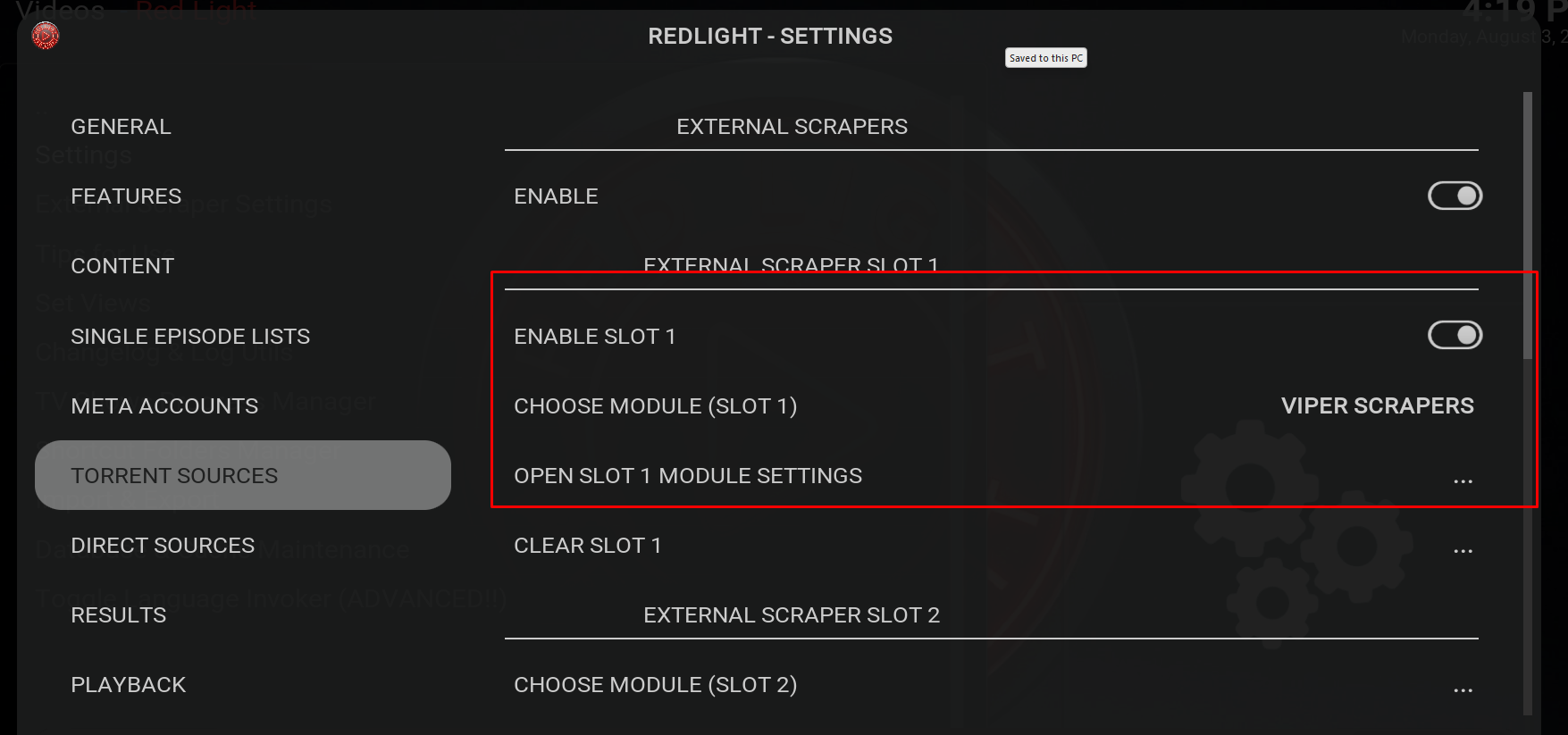
- Screenshot_40.png (196.86 KiB) Viewed 9080 times
Re: Is this broken?
Posted: Sat Sep 05, 2026 5:18 pm
by Russell
aalderaan wrote: Mon Aug 03, 2026 8:00 am
I have premiumize and real Debrid, both. But actually was unaware of any issues with RD. Been under
the weather for a bit and bogged down with work so not been paying too much attention to much lately
If you use both, give Premimize a higher priority than RD in your Addon Settings. A number lower than 10 gets higher priority.
I don't know what color Premiumize links show ip in, but RD are red and Torbox are green. So far I'm finding it much faster than RD. There are tons of features that I don't think I'll ever use or learn. I'm old now.